oofPad 2027 · free · for Windows 10 and 11
Your notes go blank when you look away.
oofPad is a tabbed notepad that hides its text the moment you switch to another window, so a coworker walking by or a screen you share sees bars instead of your notes. Come back and the text is there again. It also keeps itself out of screenshots and recordings, if you want.
Free for personal and business use. No account, no sign-up, no installer needed.
What it does
Blank the moment you look away
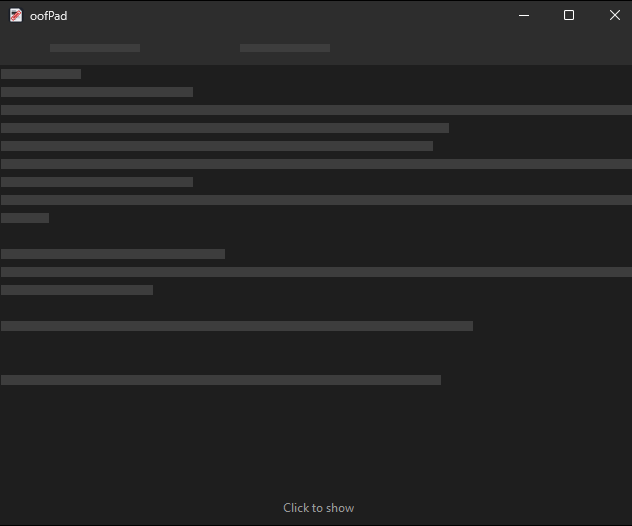
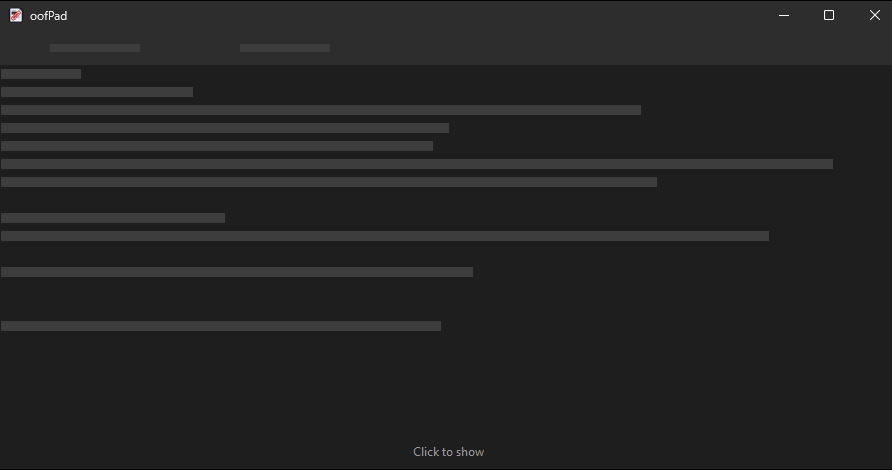
Switch to another program, minimise, lock the PC or disconnect a remote session, and the tabs and text turn into grey bars, the window title into just "oofPad". Taskbar thumbnails and Alt+Tab show the bars too. Optionally also after a number of seconds without input.
Back on your terms
Choose what brings the text back: switching to the window, a click in it, or a key combination only you know. Hidden text looks like redaction bars, one per line, or like nothing at all.
Out of screenshots and shares
Hide the Window from Screen Capture keeps oofPad, its menus and its dialogs out of screenshots, recordings and screen sharing in Teams, Zoom and the like, even while you type in it: oofPad simply doesn't appear in them.
Nothing to save, nothing lost
Close oofPad and every tab comes back next time, saved or not. Unsaved text is kept encrypted for your Windows account, or under a password of your own, and can ask for that password again after the text was hidden for a while.
Everything a notepad needs
Tabs you can drag, find and replace, go to line, word wrap, zoom, any font, a light, dark or system theme, and printing with page ranges. Files keep their encoding (UTF-8, UTF-16, ANSI) and line endings.
Copies that don't linger
Text you copy from oofPad is marked so Windows keeps it out of the clipboard history (Win+V) and out of cloud clipboard sync to your other devices.
How it looks
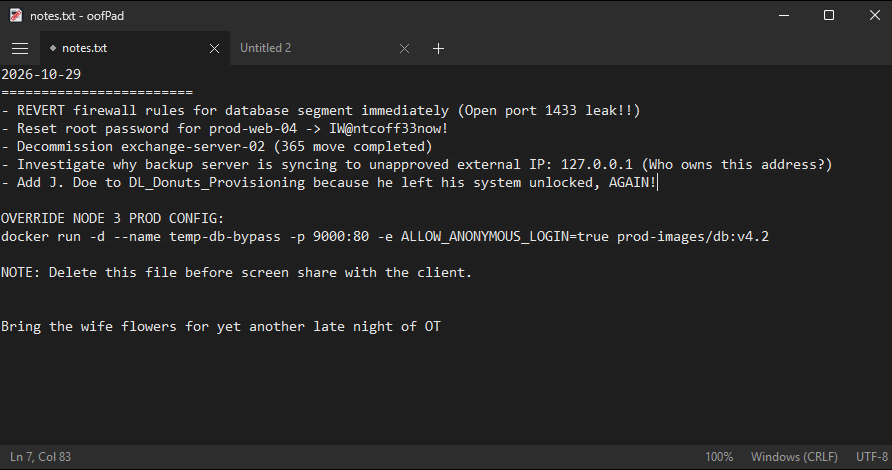
The same window, in use and a second after you switched away. The bars stand where the lines are, so you still see how much you wrote, but nothing of what. If even that says too much, choose Blank in Privacy Settings: the text area then stays empty, and only the number of open tabs shows.
Good to know
What oofPad protects, what it can't, and how it behaves on your computer.
What it protects, and what it doesn't
oofPad protects against:
- other people reading the window when you have switched away;
- screen sharing, screenshots and recordings, when Hide the Window from Screen Capture is on, including its menus and dialogs;
- someone reading the saved session from disk: unsaved tabs are stored encrypted for your Windows account, or under your password when you set one.
It does not protect:
- text on screen while you are working in the window;
- a screen share made on another computer: when oofPad runs in a remote session, the computer you connect from captures that session as a picture;
- the program's memory while it runs, or other programs running under your Windows account, which can read the text through Windows' accessibility features, also while it is hidden;
- files you save yourself: those are ordinary text files.
The password, and forgetting it
Without a password, unsaved tabs are encrypted for your Windows account. With one (Set Password in the menu), they are encrypted under it (Argon2id and AES-256-GCM), and oofPad asks for it at start, and optionally again after the text was hidden for a number of minutes.
- There is no way to recover a forgotten password. "Forgot It..." at the password prompt starts oofPad empty and keeps the old data aside as backup files, in case the password comes back to you.
- Files you saved yourself are never affected; the password only covers oofPad's own session.
Portable or installed
oofPad is one signed program file. Start it from anywhere, a USB stick or your Downloads folder, and it runs. If you want it in the Start menu, choose Install oofPad... in its menu: it copies itself to your user profile, adds a Start menu entry and an entry in Settings > Apps to uninstall it. No administrator rights are needed.
- Either way, settings and tabs are kept in
%APPDATA%\oofPadon the computer you use it on. - To update an installed oofPad, run the new version and choose Update Installed oofPad....
- For a rollout:
oofpad.exe --install --quietinstalls without any window,--uninstall --quietremoves it again; the exit code is 0 on success.
Update check
oofPad contacts guilderworks.com only to check for updates, and only if you allow it. It asks once, at first start, and you can change your answer in Check for Updates.
- The check downloads a public list of versions and compares it on your computer. Nothing about you, your computer or your notes is sent. As with any web request, the server sees the IP address the request comes from.
- It runs at most once a day. oofPad never downloads or installs anything by itself; when there is a newer version, it opens a window that links to the updates page.
- For a rollout, an administrator can answer the question in advance by setting the value
UpdateChecktoonoroffunderHKCU\Software\GuilderWorks\oofpad.
Privacy
oofPad has no account, no telemetry and no activation. Your notes stay on your computer. The only contact with guilderworks.com is the update check above, if you allow it.
Details are in the privacy statement.
Download
oofPad is free, for personal and business use, on as many computers as you like. You may pass on the unmodified download to others.
oofPad 2027.0.1 for Windows 10 and 11, 64-bit. One file, code-signed by GuilderWorks. Its size and SHA-256 checksum are on the updates page.
Before downloading, please read the GuilderWorks Freeware License; you can save a copy from that page. oofPad shows the license again when it first starts, and asks you to accept it.
Signed by GuilderWorks. Windows may still show a SmartScreen warning for a while after a new release, until enough people have run it: choose More info > Run anyway.
Requirements and support
Requirements
- Windows 10 (version 2004 or later) or Windows 11, 64-bit.
- No administrator rights, no installer, no service.
- On Windows 10 the title bar turns light or dark with the theme, in Windows' own colors; the matching colors of the dark theme need Windows 11.
oofPad 2027
Supports Windows 10 and Windows 11 as released up to 31 December 2027. Security fixes for this release line until 31 December 2031; like every version of oofPad, they are free.
Questions or problems: support@guilderworks.com. We read every message and help where we can. All releases and security fixes are listed on the updates page.